Showing posts with label Raspi. Show all posts

Thursday, May 4, 2017

Weekly Wednesday Update #18

Goal Update
Its been a productive but busy month. Lots of rain this past week kept me inside as I didn't want to catch a cold with all the travel I'll be doing in the next few weeks. Now that I have joined the runyourbq team, I should be increasing my mileage a bit… because 100 a month isn't enough.

April Totals
Miles Swam: 1.25 [2.89]
Miles Run: 103.66 [385.81]
Tacos Ate: 81 [349]
Miles Biked: 200.35 [865.75]

Weekly update
Miles Swam: 0 [2.89]
Miles Run: 17.43 [385.81]
Tacos Ate: 18 [352]
Miles Biked: 46.24 [876.96]

Things I worked on

Unfortunately, I underestimated the time it would take to complete some projects, but hey I got some work done. Check it out.
Well the table isn't flat...
Skins to start

Add 0.5" MDF to top 
Add weight to glue flat


Time to make it flat...

DONE!

Fun Picture

The right most strip was from 0.75" MDF; gives me a straight edge to clamp against

And some fidget spinner fun

Favorite Podcasts of the Week

Another great podcast on the importance of diet, more data points to help me fuel my goals.
I am really becoming a fan of the strength running podcast. The information I'm learning on here I have never heard of before even though I've been running competitively for 20 years and I'm only 27. Very interesting podcast on injury prevention, athleticism and running healthier and faster.

Favorite Quote(s) of the Week

"You become who you spend time with." - Aaron McHugh

Random of the Week

This past week I have spent a lot of time looking back at what I have accomplished, my future goals and what I am doing to accomplish those goals. The reason this post is late is because I stopped thinking about my next steps, I overcame my fear and I started making major steps towards those goals.

In the past week, I got approval from the board of directors of my company to procure and install the equipment for the major project I was working on for the past two years.

More to come... What have you done lately to try and accomplish your goals?

Time to write post: 4 days.... :(

Wednesday, April 5, 2017

Weekly Wednesday Update #14

Goal Update
Another week of grinding it out. Need to get to the pool more often, but I am getting much more efficient swimming. My sets are getting longer, breaks shorter and most importantly I don’t feel like I am going to die. Got outside to run on Saturday, followed by a nice 12 miles on the dreadmill Monday... (insert Been steadily biking; may take the bike out for the maiden voyage on the road Sunday (highs near 70!) after it snows tomorrow… Classic Michigan…

Weekly update
Miles Swam: 1.25 [2.89]
Miles Run: 26.01 [322.47]
Tacos Ate: 22 [281]
Miles Biked: 48.36 [668.41]

Things I worked on

This week I did a little finishing work on the CNC control box; switching the motor halt switch from a normally opened button to a normally closed button so it would actually work (all other end stops are normally closed - TinyG requires them to all be the same), then I designed, painted and installed some hangers for the control box to attach to the table (to do this weekend). I plan to install the t-track and waste board over the weekend so that I can start making things again!
In the meantime, I installed a smart thermostat that I can control with my home automation platform (Smartthings - I should write up a review on that sometime), did some spring cleaning around the house, cleaned out my garage for future projects and spent a lot of time studying/doing problems for the PE exam coming up in just over 2 weeks. This section should get a bit busier once I get that exam off my plate.
Oh yea, almost forgot. I have been meaning to set up retropie on one of my raspberry pis and I finally did it! Pretty much followed this guide step by step and then added some ROMs, and then played Super Mario Brothers for a few hours… Oops.

Favorite Podcast of the Week

This podcast spoke to me; a lot of people chalk up their success to hard work, or those who feel cheated say others were lucky. This podcast gave me a refreshed outlook on luck and how if we work hard, more luck will seem to find us. Have a listen, let me know what you think in the comments below.

Favorite Quote(s) of the Week

"Preparation + skill + perseverance equals luck." - Jason Flom

“I am a great believer in luck. The harder I work, the more of it I seem to have.” - Coleman Cox

Random of the Week

For those of you who have heard of SpaceX, did you see what they did last week? If you haven’t heard of SpaceX, stop reading and watch this video: https://www.youtube.com/watch?v=0qo78R_yYFA

Okay now that we are on the same page, last week (3/30/2017) SpaceX launched and landed the first ever re-used rocket.

Why you may ask?
The answer is to make space flight economical.

Why would we want that?
For the same reason you backup your computer hard drive (if you don’t seriously, spend $20 to get an external hard drive and copy your important files to it monthly so you aren’t dead in the water when your hard drive decides to die).

But Zach, seriously how does making space travel economical equate to backing up your hard drive?
Simply put, by making space travel economical, we can make sure the human race does not suffer the fate of numerous life forms that have lived on earth and been wiped out through a massive extinction event.
Blue circle: People who can afford to go to Mars. Yellow circle: People who want to go to Mars. Green intersection: At least a million people
Copied from http://waitbutwhy.com/2016/09/spacexs-big-fking-rocket-the-full-story.html

Where did I get this idea?
Well there is an amazing blog called “waitbutwhy.com” (seriously awesome domain name), created by Tim Urban, that explores various questions from a 4 part series on Elon Musk aka the real life Iron Man (Telsa, SpaceX, and everything else - a long, nerdy read, but AWESOME), to Why Cryonics Makes Sense, to Why you secretly hate cool bars. His blog posts are full of entertaining thoughts and details, which I tend to resonate with. If you have some free time and want to better yourself or be able to have weird nerdy conversations with me, please take a look at Tim’s blog.

Time to write post: 28 minutes


Saturday, February 4, 2017

My CNC Control Box: Use Raspi GPIO Pins to Control CNC

After a year or so of running my X-carve with a laptop on a slide out drawer below my machine, I wondered if it was possible to add simple control buttons to the raspberry pi to control the X-Carve (i.e. feed hold, pause, resume, etc.). After some digging through the forums, blogs and numerous other sources, I couldn’t find anything. One day, while looking through the Chilipeppr interface, I found Frank Graffagnino's Shuttle express controller. Frank connected a Shuttle Xpress USB device to his Raspberry pi controlled Shapeoko to jog his spindle around. After digging into his code, it looked like he had created exactly what I was looking for; raspberry pi buttons to add commands to the Serial port JSON server.

Well, here goes nothing!
Note: I did make a backup of my current raspbian image (using Win32DiskImager) before messing around so I would have a fail safe to go back to.

Build Instructions

(Written for Raspbian, but should work for others)
Ensure openssl dev libraries are installed: (~1 min on Raspi2)
sudo apt-get install libssl-dev build-essential

Install nopoll library (~ 1.5 mins)

Download the nopoll library from here: http://www.aspl.es/nopoll/downloads/ (I'm currently using version 0.2.9.b207).
cd ~
wget http://www.aspl.es/nopoll/downloads/nopoll-0.2.9.b207.tar.gz

Extract and change into the extracted directory
tar -xzvf nopoll-0.2.9.b207.tar.gz
cd nopoll-0.2.9.b207

Configure, make, and install the nopoll library with the usual:
./configure
make
​sudo make install

Install cURL (~10 mins)

Download the cURL library from here: https://curl.haxx.se/download.html
cd ~
wget https://curl.haxx.se/download/curl-7.52.1.tar.gz

Extract, configure, make, and install the cURL library with the usual:
tar -xzvf curl-7.52.1.tar.gz
cd curl-7.52.1
./configure
make
sudo make install

Install WiringPi (~0.5 min)

This step is only necessary if you want to have LEDs or switches hooked up to a raspberry pi.
If you aren't using led's and switches, just edit the Makefile and change the GPIO_SUPPORT to 0 to disable it. You can also remove -lwiringPi from the libs line.

Take a git clone of the wiringPi utility and use their included build script to build and install the library. Instructions are here: http://wiringpi.com/download-and-install/
Change directory back to your home directory or wherever you were working from
cd ~

A quick version of the wiringPi instructions
git clone git://git.drogon.net/wiringPi
cd wiringPi
./build

Install ShuttleCP (~2 mins)

Download ShuttleCP from Github at https://github.com/lordmundi/shuttleCP.

Change directory back to your home directory or wherever you were working from
cd ~
git clone https://github.com/lordmundi/shuttleCP

Change into the shuttleCP directory
cd shuttleCP 

Edit shuttlecp.c and update the following items at the top of the file if you need to. You can likely just leave them alone:
sudo nano shuttlecp.c

#define CNC_HOST "localhost"           // Hostname where SPJS or bCNC is running
#define CNC_PORT "8989"                // Port for SPJS or bCNC. ;Typically 8989 for Chillipeppr and 8080 for bCNC
#define DEVICE_PATH "/dev/ttyUSB0"     // Path for SPJS to connect to GRBL or TinyG. ;Not used for bCNC
#define TINYG "1"                      // set to 1 if you are using a TinyG
#define BCNC "0"                       // set to 1 if you are using bCNC instead of Chilipeppr
#define CYCLE_TIME_MICROSECONDS 100000 // time of each main loop iteration
#define MAX_FEED_RATE 1500.0           // (unit per minute - initially tested with millimeters)
#define OVERSHOOT 1.06                 // amount of overshoot for shuttle wheel

CNC_HOST circled in red, DEVICE_PATH circled in blue

Crtl-x to save, then 'y' to confirm

Build the shuttleCP binary by running make in the shuttleCP directory.
make

I also do the following to install shuttlecp so that it can be run regardless of which folder you are in when you execute the program.
sudo make install

Running

​1. For ChiliPeppr, first, make sure SPJS is already running and ChiliPeppr has already opened a connection to your machine. I run SPJS on the same raspberryPi that I run the ShuttleCP utility on.
For bCNC, make sure that bCNC is running and is connected to the GRBL board.
2. All alarms must be clared and the CNC machine state is reported as "Idle".
3. Start up shuttlecp with an argument that is the device interface for your ShuttleXpress. Mine is /dev/input/by-id/usb-Contour_Design_ShuttleXpress-event-if00
Use sudo so that wiringPi has access to GPIO pins:​
sudo ./shuttlecp /dev/input/by-id/usb-Contour_Design_ShuttleXpress-event-if00
​Or, you can use the "./shuttle" script, which effectively does the same thing.

As I do not currently have the shuttle device, I got the following output when running “./shuttle”:
pi@JSON-CNC-test ~/shuttleCP $ ./shuttle
Starting shuttleCP ...
Attempting connection to JSON-CNC-test:8989
Websocket connected.
/dev/input/by-id/usb-Contour_Design_ShuttleXpress-event-if00: No such file or directory

Again, I went back to the Github source and looked for why this was happening. In the main loop of the shuttlecp.c file, I found the code loops until the device is connected. Therefore, by changing line 386 in shuttlecp.c from
shuttle_device_connected = 0;
to
shuttle_device_connected = 1;

I was able to bypass this loop and still utilize the code for the Raspi switches and LEDs.

Now to test the switches and LEDs…
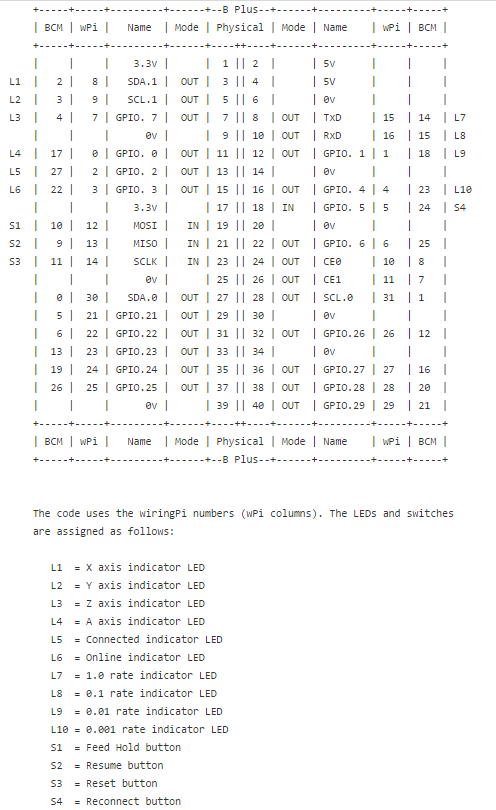
Below is a image showing the wiring for the RASPi and WiringPi
From https://github.com/lordmundi/shuttleCP/blob/master/README_pinout.txt   

Using the above chart as a reference, I wired up up some LEDs and buttons and then commented out (my commented shuttleCP verision is located here - note the instructions at the top) a lot more code. Then you must re-make and install shuttleCP

make
sudo make install

 and tried to run it using this command....

sudo ./shuttlecp /dev/input/by-id/usb-Contour_Design_ShuttleXpress-event-if00


which gave this result...
pi@JSON-CNC-test ~/shuttleCP $ sudo ./shuttlecp /dev/input/by-id/usb-Contour_Design_ShuttleXpress-event-if00
Attempting connection to JSON-CNC-test:8989
Websocket connected.
Shuttle device connected.
RESUME detected
Sending websocket cmd: send /dev/ttyUSB0 ~

​​​    + Successfully sent cmd: send /dev/ttyUSB0 ~

Sent 1 commands


Success!!!Now go hook up your Raspberry Pi with some LEDs and buttons so you can control your TinyG from your workbench without a computer!!!!

Set up the Script to Auto Start

If you have read my previous post on making the GPIO server auto start, this follows the same process.

The first step; however, was to remove the need to pass an argument to the shuttlecp program. This was done by commenting out the following lines in the int main function (approximately line 376) from the shuttlecp.c file:

// if (argc != 2) {
  // fprintf(stderr, "usage: shuttlecp <device>\n" );
  // exit(1);
//}

//dev_name = argv[1];

All this is doing is removing the need to pass the device name in with the execution command. WE will then replacing the last line with the following to 'hard code' a fake device name (its not used at this time anyways). Note: this will change if you actually want to control the CNC machine with some sort of controller...

dev_name = /dev/input/event0;

Then edit the start-up script by entering the following command (visit this github for more info and search for 'start-up')

sudo nano /etc/init.d/serial-port-json-server

and add the following line to the case "$1" arguments:

/home/pi/shuttleCP/shuttle

Here is my case "$1" for reference:

case "$1" in
  start)
    log_begin_msg "Starting Serial Port JSON Server service"
# do something
     /home/pi/serial-port-json-server-1.92_linux_arm/serial-port-json-server -regex usb &
     /home/pi/gpio-json-server &
     /home/pi/shuttleCP/shuttle

  log_end_msg $?
  exit 0

To exit, press 'crtl' + 'v', then 'y' to save. Then make the script executable with

sudo chmod +x /etc/init.d/serial-port-json-server

and finally, update it.

sudo update-rc.d serial-port-json-server defaults

Now reboot with

sudo reboot

If all goes well, when you open chilipeppr and hit a button, you should see commands show up in the serial port console on.

~ is the resume command and ! is the feedhold command

Now we just need a way to control x, y, and z motion... 

Wednesday, February 1, 2017

Weekly Wednesday Update #5

Goal Update
The January numbers are in! It was a good start to the year; a little upset I didn’t look at my milage yesterday and run 7 more miles to hit 100 this month! Not sure what to think about eating more tacos than running miles… I’ll let you be the judge. February I am determined to get in the water (even if it's ice/snow outside) - can’t believe I said that either. I just bought the Total Immersion: The Revolutionary Way To Swim Better, Faster, and Easier (affiliate link) and Total Immersion Swimming: Perpetual Motion Freestyle in Ten Lessons DVD (affiliate link) per the recommendation from Tim Ferriss to help with my swimming technique.
Miles Swam: 0 [-22.93]
Miles Run: 93.04 [+8.11]
Tacos Ate: 102 [+17.07]
Miles Biked: 197.08 [+25.77]


Weekly update - Note: this past week was a ‘recovery’ week. I did try to reduce mileage and/or time by 10-20% and slowed down the pace (keep HR <145) quite a bit to let my body recover.
Miles Swam: 0 [0]
Miles Run: 22.8 [96.64]
Tacos Ate: 22 [105]
Miles Biked: 51.12 [212.23]

Things I worked on

I regret to inform you, I am a chronic optimist that believes he can watch paint to make it dry faster and that all plans will proceed without error or failure. Unfortunately, I did not finish my Z-Carve workbench, the electronics case, nor transforming my X-Carve into the 1800mm upgraded Z-Carve. Maybe this weekend? Well, that is the plan. The good news is I am currently covered in paint from finishing the electronics case, have started soldering the components, and have the diagram drawn out on paper (for the most part).
Primed Z-Carve Electronics Case
Over this past weekend I called an audible and designed, built and finished a laundry basket holder to regain some floor space in my room. Made from 1x3’s, stained with ebony stain, and sealed with polyurethane. Not a bad cheap and easy project; just need to add a nice top to it… Any suggestions? Comment below. I am leaning towards a nice burnt wood top.

Laundry Basket Holder
I also tried my hand at milling aluminum. Well, I cut half of a support for the 1800mm length makerslide before I broke the bit. Probably should do some of those highly recommended chip load calculations so I don’t throw out another $15 in 3 minutes.
Milling Aluminum on X-Carve (moments before bit breaks)
Line up remains the same, few things moved around:
  • Aluminum Supports for 1800mm axis
  • Work bench with enclosure
  • Electronics case for Z-Carve
  • Dust Shoe version 2 (version 1 post here)

Favorite Podcast of the Week

The Tim Ferriss Show: Arnold Schwarzenegger Part 2! Bodybuilding, Investing, and Online Battles
This is part 2 where the fans of the Tim Ferriss show submitted and voted for the most popular questions to ask the Terminator - if you haven’t heard part 1, do it, do it now! I knew Arnold was a bad ass, but I didn’t realize to what level until hearing part 1. Part 2 just adds to it! He is a machine. Really.

Favorite Quote(s) of the Week

“Part of being successful is to give something back.” – Arnold Schwarzenegger

Random of the Week

This week I have been very interested in Raspberry Pi projects. Currently, I have two model B’s (one I am pretty sure I blew up), one B+, one version 2 and one version 3. Here is a list of what they are currently in use as:
  • Raspi B - smart garage door opener
  • Raspi B - broken?
  • Raspi B+ - smart bed stand/wake up lights (not in use)
  • Raspi 2 - JSON, GPIO server for X-Carve
  • Raspi 3 - still in box :(

There have been some recent posts (like this and this and this) that have hit my news feed [I use feedly - great app, review for another time] and caused a desire to re-evaluate the uses of my awesome mini-computers. I am currently working on adding buttons for the JSON server for my Z-Carve [all tested, just need to assemble] which I will then add one more awesome feature to so stay tuned! Next, I want to combine the Raspi Echo with my smart bed stand, which will be awesome - think wake up lights controlled by saying ‘Alexa - wake me up an hour before sunrise.’ Then, I need to fix/convert my smart garage door opener so it doesn’t drop wifi each week, or convert it to an ESP8266. And finally, I need to build a photo booth for a few weddings this fall.


After this lovely ramble, seriously people go out and buy a Raspberry Pi 3 Model B Motherboard (affiliate link) for $35, take it out of its box and start making stuff. All the instructions are online (I will add my builds as I finish them), the worst case scenario is you blow it up (which is fun!) and you are only out $35 but learned what not to do for the next time.

Time to write post: 35 minutes

Wednesday, January 25, 2017

Weekly Wednesday Update #4

Goal Update

Miles Swam: 0 [0]
Miles Run: 19 [73.84]
Tacos Ate: 15 [80]
Miles Biked: 58.07 [161.11]

February will be pool time! Already 18 miles behind schedule! This week has been a recovery week (every 4 weeks), where I have been attempting to reduce mileage and effort by ~10-25%.


Things I worked on

Time is flying by! Wow. Started cracking open the books and doing practice problems in preparation for the Mechanical Engineering Principles and Practice of Engineering Exam in April! This is the last step needed to obtain my PE License; and to be honest, my book problem solving capabilities is a bit rusty. Well, I have about 3 months to study up and get ready for the 8-hour exam. The good news is it's already coming back. :)
As can be expected, while the amount of aerobic activity and studying increase over the next few weeks, the time in the shop will be a bit limited. Don’t worry though! This weekend I plan to build the rest of my new workbench, my new electronics enclosure and hopefully finish the 1000 → 1800mm upgrade to my X-Carve, effectively transforming it into what I will deem as the Z-Carve. I will try some to capture the mess on camera with stills, time lapse and video so stay tuned!
Line up remains the same, few things moved around:
  • Aluminum Supports for 1800mm axis
  • Work bench with enclosure
  • Electronics case for Z-Carve
  • Dust Shoe version 2 (version 1 post here)

Favorite Podcast of the Week


In this podcast, Dave interviews the host of another one of my favorite podcasts, Jordan Harbinger from the Art of Charm podcast. Throughout this interview you hear how AoC came to be and some of the crazy things Jordan has gone through during his lifetime. It is a very inspirational podcast that helps introduce the Art of Charm podcast and give it some credibility. Check it out and let me know what you think!

Favorite Quote(s) of the Week

"Being realistic is the most common path to mediocrity." - Will Smith

“Don't count on motivation; count on discipline." - Jocko Willink

Random of the Week

This week while working on my electronics case, I have had to dig into lots of [Raspi C#] code and wiring diagrams to begin making sense of the magic behind the electronics that we now take for granted. I forgot how much I enjoy diving into the nitty gritty details of these magic boxes! The attention to detail required is awesome as one mistake can cause a component to 1) not work [as anticipated], 2) break or 3) cause a fire. Don’t worry, I am doing my research and documenting the circuits with a nice free tool called Fritzing to ensure I put the electronics together correctly and don’t start a fire! This project also gives me the opportunity to add some safety features to my controller that I currently do not have such as fuses and motor kill switches. And so I don't feel like I am skipping out on studying for the PE exam, I have used this opportunity to jog my circuit analysis memories (honestly, with simple LED circuits where I basically only use V=IR) in order to size my resistors correctly.


While I understand the basics of circuits analysis and was rather good at it in college, it is honestly one area that takes me out of my comfort zone, which allows me to grow. This reminds me of another quote (gotcha!) “You never change your life until you step out of your comfort zone; change begins at the end of your comfort zone.” ― Roy T. Bennett.

This week I challenge you to step outside of your comfort zone, honestly, what’s the worse that could happen?

Time to write post: 34 minutes